The security data pipeline
Collect every log once. Send it to any SIEM.
Mainline sits between your sources and your security tools. It recognises each event as it arrives, understands what it says, trims what you don't need, keeps a safe copy, and delivers to Splunk, Microsoft Sentinel, Elastic, Google Security Operations or wherever you choose. Change tools later, and your collection stays exactly where it is.
Run it on your own servers, even air-gapped, in containers and Kubernetes, or let us run all of it as Mainline Cloud. You choose where your events live.
Splunk receives every source, each with the sourcetype and index it expects. The archive keeps a full copy in your own storage, for replay and backfill.
Works with the tools you already run
Delivers to
- Splunk
- Microsoft Sentinel
- Elastic
- Google Security Operations
- IBM QRadar
- Datadog
- Exabeam
- Sumo Logic
- OpenSearch
- Grafana Loki
- Snowflake
- Google BigQuery
- Amazon S3
- Amazon Security Lake
- Apache Kafka
Collects from
- CrowdStrike Falcon
- Okta
- Microsoft 365
- Microsoft Entra ID
- Microsoft Defender XDR
- Palo Alto Networks
- Fortinet FortiGate
- Cisco ASA
- Check Point
- Zscaler
- AWS CloudTrail
- Google Workspace
- GitHub
- Cloudflare
- SentinelOne
- Proofpoint
- Cisco Duo
- 1Password
- Salesforce
- Windows and Sysmon
Your security data shouldn't belong to your SIEM.
When every agent and collector points at one tool, that tool sets your costs and your options. Mainline puts the pipeline back in your hands.
Collection is wired to one vendor.
Point everything at Mainline instead
Agents, syslog senders and API collectors send to Mainline. Moving to another tool, or adding one, is a routing change in the console, not a project to redeploy every server.
Most of the bill is noise.
Cut it before it's indexed
Drop, sample, deduplicate and mask events before they reach the SIEM, rule by rule, with a report of what each rule saved. Keep the full copy in cheap storage for when you need it.
Pipelines fail quietly.
Nothing lost, and nothing left unexplained
Every event is stored on the relay before it's sent, so a destination that goes down gets its backlog when it's back. When something goes wrong, Mainline says what, why, and how to fix it.
How it works
Relays collect, recognise and deliver; the console manages every relay and agent in your fleets. Both run on your servers or in Mainline Cloud.
Collect
Agents for Windows, Linux and macOS; syslog, Windows Event Forwarding, Splunk HEC, Elasticsearch bulk, OpenTelemetry, NetFlow and Kafka; and scheduled pulls from 88 vendor APIs.
Recognise and understand
Each event is matched to one of 329 source types on arrival, with no sourcetype to set, and its message is looked up in Mainline's log dictionary: what happened, why, and whether it matters.
Shape
Reduce volume, mask sensitive fields, fit each SIEM's own schema, add location and your own asset context, and flag what matches your Sigma rules or threat intelligence.
Deliver
Each destination gets the sources you route to it, in the format it expects, with retries and a durable backlog behind every one.
Mainline by the numbers
Facts you can check in the product, not projections.
A log line, explained
Mainline doesn't only know which product sent a line. Its log dictionary knows what the message means, so anyone on the team can act on it.
The same for SSH logins, sudo, firewall drops, out-of-memory kills, database sign-in failures, the Windows events that matter, and many more. Paste any line into the console to see what it means. Routine chatter is recognised too, and marked as a candidate to drop.
See every flow, and what needs a person
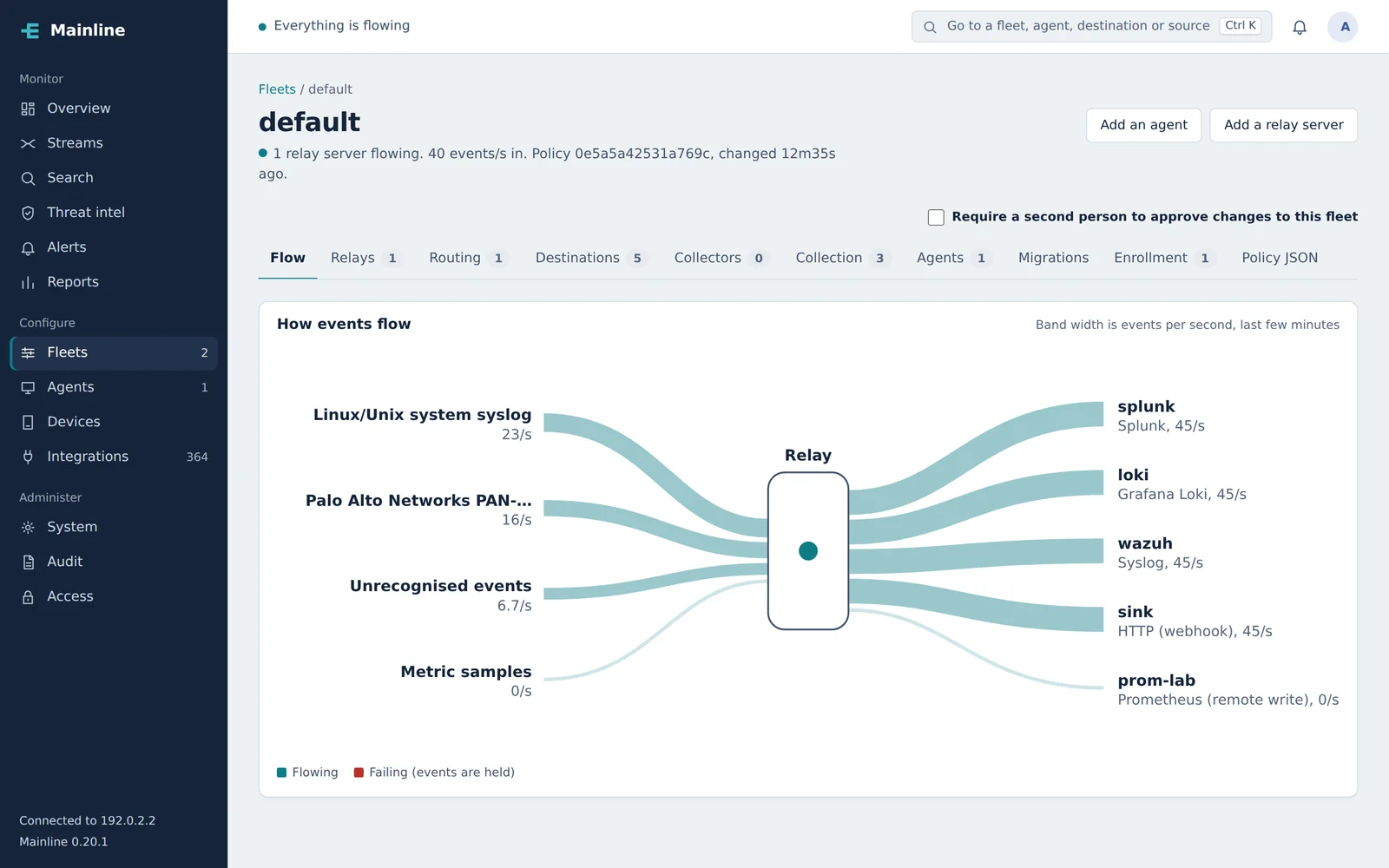
The console shows what's arriving and where it's going, and says plainly when something needs attention.
- A flow map for every fleet: sources, relays and destinations, sized by volume
- Sources that stopped sending, and destinations that stopped accepting, flagged as they happen
- Alerts to Slack, Microsoft Teams, PagerDuty, Opsgenie, email or a webhook
- Search across every relay, your archive, and Splunk, Elastic or Sentinel, without moving the data
When something breaks, it says why
Every alert and every stream issue opens with a diagnosis: the likely causes, each marked certain, likely or possible, the evidence behind it, and how to fix it.
- Read from the real evidence: the events, the relays' errors, how each sender arrives, and your configuration
- Knows how networks, TLS, credentials, SIEM APIs, clocks and disks fail, and tells a destination's problem from one relay's
- Fixes in one click where it's safe, such as dropping repeats or routing a source, each deployed as a version you can roll back
Detection starts before the SIEM
Every event is checked against your Sigma rules and your threat intelligence as it's stored, including events you send nowhere, so detections keep working whichever SIEM you use.
- Sigma rules, the shared detection format: import your own or SigmaHQ's community rules, and they run on the log sources they name, counting rules included
- Any rule as a Splunk, Microsoft Sentinel or Elasticsearch query, to carry detections to a new SIEM
- Indicators from abuse.ch, MISP, AlienVault OTX, Anomali, Recorded Future and CISA's exploited-vulnerability list, plus your own lists
- Location, network owner and your own asset tables added to every event
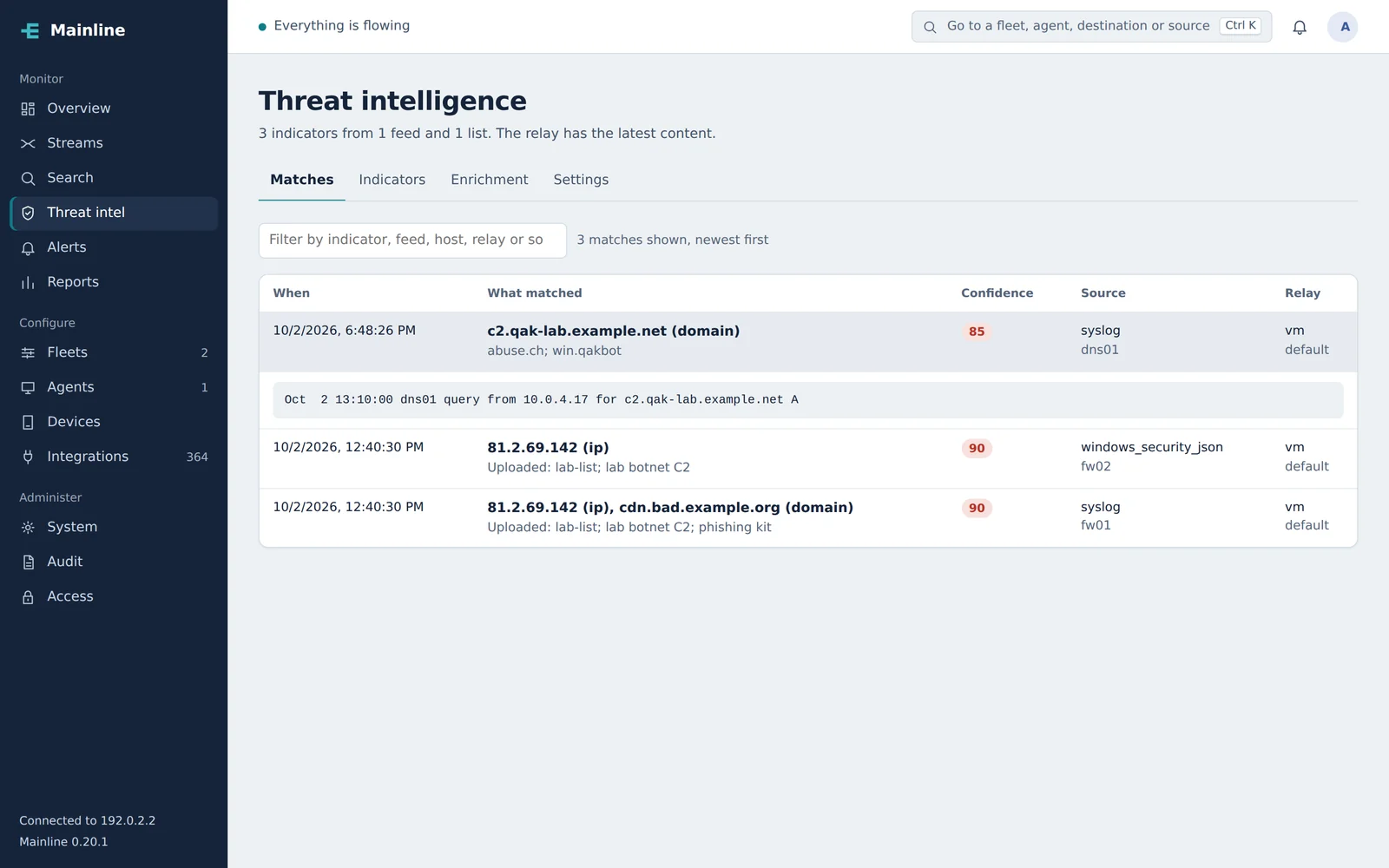
The same event, before and after
A DNS log as a server sent it, and as Mainline stored and delivered it. Nothing was configured for this source: it was recognised, matched and enriched on arrival.
ti.feed abuse.ch ti.threat win.qakbot ti.confidence 85
Where Mainline fits
Most teams come to Mainline with one of these. All of them are one product.
Cut SIEM costs
Drop, sample and deduplicate noise before it's indexed, with a report of what each rule saved. The full copy stays in your own storage.
How reduction worksMove to a new SIEM
Run the old and new side by side, prove the new one has every event, field and detection, and backfill its history.
The four stepsEvaluate SIEMs side by side
Send the same data to two or three candidates at once and compare what each received, with nothing changed on your servers.
Compare destinationsKeep logs for compliance
Months of history in your own storage as open OCSF Parquet, searchable and replayable, with a tamper-evident audit trail.
The archiveRun in sensitive environments
Air-gapped if needed, FIPS 140-3 mode on by default, signed releases and configuration, and the sign-in notice CJIS asks for.
SecurityServe many customers
For managed providers: each customer's fleets, people and data kept apart in one console, with quotas and reports for each.
Operating MainlineMove to a new SIEM without a gap
The Migration Center runs both tools side by side and proves the new one is complete, fields and detections included, before you switch.
Send to both
Route the same sources to the old and new tool at once. Nothing changes on your servers.
Compare
Mainline checks, source by source, that the new tool received every event, has the fields your searches use, and has a query for each detection. If it falls short, you're alerted.
Backfill
Send a month or two of history from the relays or your archive, from the console, so the new tool starts with context.
Cut over
Stop the old route when the numbers match. If something's wrong, the old route is one click away.
Built for environments that check everything
Mainline is built to pass a security review, and to keep your data where it belongs.
You choose where your events live
On relays in your own network, even air-gapped, or in your own storage in Mainline Cloud, kept apart from every other customer's.
FIPS 140-3 mode
Cryptography runs through the Go Cryptographic Module in FIPS 140-3 mode, on by default.
Signed releases and signed configuration
Every release is signed and ships a CycloneDX SBOM, and everything the console sends to relays and agents is signed too.
No third-party code libraries
Mainline is written on Go's standard library alone, which keeps the supply chain you have to review very short.
A tamper-evident audit trail
Every change is recorded in a hash-chained trail you can verify, export, or forward to your SIEM.
Your sign-in, your rules
Single sign-on over SAML, OIDC or LDAP and Active Directory; NIST password rules and lockout; allowed address ranges; roles per fleet and optional approvals.
Runs where you need it
The same Mainline in each. You choose where your events live.
Available
Your infrastructure
One installer for Linux on x86-64 or ARM, on your servers or in your cloud account, connected or air-gapped. It keeps the previous version, so rolling back is one command.
Available
Containers and Kubernetes
A container image, a Helm chart, and templates for AWS and Azure that set up relays in your own account and network.
Available
Mainline Cloud
We run all of it, your console, relays and event storage, and you install only agents. Or keep relays in your network and let us run just the console.
Agents for Windows, Linux and macOS install from the console with one command, and upgrade from there too. Compare the ways to run Mainline.
Start with one source and one destination.
A pilot runs on your own servers: pick a source that matters, a destination you use, and what success looks like. We'll help you set it up.